STARTECH USB2DVI Usb Dvi Adapter Secondary Display Monitor 065030826617 2.0 1600X1200 32BITS
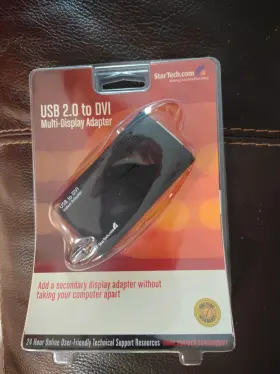
( Brand: Startech ), ( Connection Split/duplication: None ), ( Connector S B: Dvi Female ), ( Connector A: Usb 2.0 ), ( Color: Black ), ( Type: Dvi Adapter ), ( UPC: 065030826617 ), ( Manufacturer Part Number: USB2DVI )
Review STARTECH Usb 2.0 To Dvi Adapter 1600x1200 32bits Secondary Multi Display Monitor
The StarTech.com USB2DVI USB 2.0 DVI Adapter is a versatile solution for expanding your computer's display capabilities. This adapter converts a USB 2.0 connection to a full DVI interface, enabling you to add a secondary monitor with a maximum resolution of 1600x1200 pixels and a 32-bit color depth.
Crafted from high-quality components, this DVI adapter is designed to deliver reliable and consistent performance. It supports both analog and digital DVI signals, making it compatible with a wide range of monitors. The adapter also features a built-in DVI-I to DVI-D converter, allowing you to connect a digital DVI monitor even if your computer only has an analog VGA port.
The StarTech.com USB2DVI adapter is plug-and-play, meaning you don't need to install any drivers or software to use it. Simply connect the USB end to your computer and the DVI end to your monitor, and your computer will automatically recognize the new display. The adapter also supports multi-streaming technology, allowing you to connect multiple displays to one computer without the need for additional adapters.
The compact design of the USB2DVI adapter makes it easy to transport and use in various environments. It's also backed by StarTech.com's industry-leading 2-year warranty and free lifetime technical support. Whether you're working in an office, at home, or on the go, this USB 2.0 DVI adapter is an essential tool for increasing your productivity and enhancing your computing experience.
The StarTech USB2DVI DVI Adapter is a solution for users who want to add a secondary monitor to their computer using a USB connection. Here are some pros and cons of buying this particular adapter:
Pros:1. Plug-and-Play: This adapter is easy to use as it is a plug-and-play device. Once you connect the DVI cable from the adapter to your secondary monitor, and the USB cable from the adapter to your computer, the monitor should automatically be detected and configured.
2. 1600x1200 Resolution: The StarTech USB2DVI adapter supports a maximum resolution of 1600x1200 pixels, which is suitable for most office applications and multimedia tasks.
3. 32-bit Color Depth: The adapter supports 32-bit color depth, which ensures that images and videos displayed on the secondary monitor have vibrant and accurate colors.
4. USB Powered: The adapter is USB-powered, which means that it does not require an external power source, making it more convenient to use than some other solutions.
5. Compatibility: This adapter is compatible with most operating systems, including Windows, Mac OS X, and Linux.
Cons:1. Limited Bandwidth: Since the adapter uses a USB 2.0 connection, it may not be able to support high-bandwidth applications, such as video editing or 3D rendering, at the maximum resolution.
2. Limited Display Size: The maximum resolution of 1600x1200 pixels may be limiting for users who require a larger display size for their work or multimedia tasks.
3. Potential Compatibility Issues: While the adapter is generally compatible with most operating systems, there have been reports of compatibility issues with some older or specific systems.
Conclusion:The StarTech USB2DVI USB 2.0 DVI Adapter is a convenient and easy-to-use solution for users who want to add a secondary monitor to their computer using a USB connection. While it may not be suitable for high-bandwidth applications or users who require larger display sizes, its plug-and-play functionality, compatibility with most operating systems, and support for 1600x1200 resolution and 32-bit color depth make it a solid choice for most office and multimedia applications.
Recommendation:If you are looking for a USB-based solution to add a secondary monitor to your computer, the StarTech USB2DVI USB 2.0 DVI Adapter is a good choice. However, if you require a larger display size or high-bandwidth applications, you may want to consider other solutions, such as an external graphics card or a Thunderbolt-based adapter.
Details:
Here are the specs, per back of package: Supports a maximum resolution 1600 x 1200 32bit. Has one USB 2.0 Type A connector and DVI-I single link female. Minimum requirements: Pentium class computer that supports USB 2.0. The packaging shows it compatible with Windows Vista and later.
Supports Windows 20 XP, Vista, and higher it should work with modern systems, just don't expect high definition. I bought it years ago when was first learning to set up multiple displays, realized had the wrong model, then left in storage untouched. You'll want use this if you're trying an older monitor as a secondary or multi-display setup, so it'll be especially useful rigging sort of retro is computing/gaming environment where you don't need modern HD displays or just otherwise bringing old PC back into service.
part #: 065030826617 prices
- $25.00-$59.99
specifications monitormondo:
- brand: Startech
- connection split/duplication: None
- connector s b: Dvi Female
- connector a: Usb 2.0
- color: Black
- type: Dvi Adapter
- upc: 065030826617
- manufacturer part number: USB2DVI
payments monitormondo:
- wallet: Apple-pay
- credit card: Discover
- other
shipping monitormondo:
- cost: $7.15
- type: Calculated
- service: USPS Ground Advantage
- carrier: USPS
- class: Standard
- transit: 5-12 Days
seller monitormondo:
- # reviews: 388
- city: Carrollton, Texas
- rating: 0.0%
offer monitormondo:
- started: June 20, 2025
- best offers: True
- sold: 0
- options: Ship-to-home
- quantity: 1
- availability: In Stock
general monitormondo:
- Computers/Tablet's Networking > Computer Cables Connectors > Monitor/AV Cables Adapters
- condition: New
returns monitormondo:
- policy: No Returns
Startech USB2DVI Is Similar To:
- Startech Usb32vgav Set Of 2 Usb To Vga Display Adapter Black (45.3% similar) Set of 2 - Startech usb 32 VGA usb to VGA display adapter black...(July 21st, 2024)
- Startech Mstcdp123hd Startech.com Usb C To Hdmi Multi-monitor Adapter 3-port Mst Hub Multi (44.4% similar) The adapter is designed to work with usb 3.0 and supports a variety of devices, including laptops, desktops, tablet's. Its compact design and oz unit type make it easy to carry around, making perfect for on-the-go use. With its 3-PORT MST hub, you can easily connect your usb-c device to three...(July 21st, 2024)
- Startech Hd2vgae Hdmi To Vga Adapter Converter With 6 Ft Cable Free Ship (39.3% similar) HDMI cable and supports a range of devices, making it versatile option for anyone in need reliable connection. This Startech HDMI to VGA adapter converter HD2VGAE is the perfect solution for those who need connect their devices with high-quality cables. The black color and sleek design make it...(July 22nd, 2024)
- Startech Dp2hdmi2 Displayport Male To Hdmi Female Video Adapter Converter (39.8% similar) With its display port male connector and HDMI standard female connector, you can easily connect the two devices enjoy a seamless display experience. This display port adapter is perfect for those who want to enjoy high-quality video output without the need a bulky and expensive setup. The adapter...(July 23rd, 2024)
- Startech Cdp2hd Startech.com Usb Type C To Hdmi Adapter Type-c Video Converter Used (42.8% similar) The adapter is designed with HDMI standard female connector and a usb type c male connector, making it easy to connect your devices monitor or TV. The black a/v cable is durable and provides a stable connection, ensuring that you can enjoy your videos or games without any interruptions...(July 23rd, 2024)
- Startech Cdp2dvi Startech.com C To Displayport Adapter Dongle Monitor (52.2% similar) Pre-owned but in great condition...(July 30th, 2024)
- Startech 4619020123 Lot Of 3 Display Port To Dvi Adapter Dvi-d Model Dp2dvis (39% similar) With its sleek black design and flat cable, this adapter offers a high-quality connection that is sure to impress. Cable length , making it easy to connect your device from a distance.the adapter features display port male connector on one end and dvi female the other, allowing for secure...(July 31st, 2024)
- Startech.com Dp2vgdvhd Startech.com Dp To Dvi Vga Hdmi Adapter (38.7% similar) ...(August 9th, 2024)
- Startech Mdp2hdw Mini Displayport To Hdmi Video Adapter Converter White (32.3% similar) The adapter comes with a mini display port 1.2 digital audio/video male connector and an HDMI 1.4 female connector, making it easy to connect variety of devices. This display port adapter is ideal for those who want to connect their devices without any fuss. The 5 cable length ensures that you can...(August 14th, 2024)
- Startech Mdp2dpmm4m Display Port Cable (36.5% similar) All refurbished products come with adapters when applicable. Startech MDP2DPMM4M display port cable: manufacturer Startech, model part number. All other accessories may/may not be included...(August 19th, 2024)
- Hp Startech Foxconn Hpk-481409-001 Lot Of 80 Displayport Dp To Dvi Video Adapters Bizlink (29.4% similar) Sale includes 80 used display port to dvi adapters. Pulled from working environment. 32X hp / foxing HP-481409-001 12X hp / biz link 1149 481409-002 12X hp 481409-001...(August 19th, 2024)

4 offers $25.00–$59.99 USD
- Open box. Offer #1 priced at $25.00 + $6.07 delivery = $31.07* total. +$6.07 shipping
- New. Offer #2 priced at $40.00 + $11.35 delivery = $51.35* total. Has one USB 2.0 Type A connector and one DVI-I single link female connector. (I bought it years ago when I was first learning to set up multiple displays, realized I had bought the wrong model, then left it in storage untouched.).+$11.35 shipping
- Used. Offer #3 priced at $59.99 + $8.75 delivery = $68.74* total. Shows normal wear. Tested and found to be in working condition.+$8.75 shipping
- Used. Offer #4 priced at $29.99 + $0.00 delivery = $29.99* total. Made by the trusted brand StarTech and manufactured in Taiwan, this adapter ensures reliable performance and compatibility with a variety of devices. The Startech 3 USB to DVI Adapter allows users to easily extend their desktop to a 1920x1200 resolution display, making it ideal for graphic design, video editing, or other tasks that require a high level of visual accuracy.FREE SHIPPING