STARTECH WIFI2HDMC Wireless Display Adapter Hdmi 065030852777 1080P
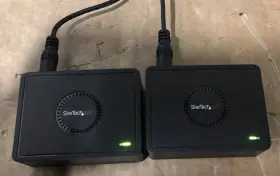
( Brand: Startech ), ( Connector S B: 3.5 Mm Mini-jack ), ( Hdmi: 19 Pin Female, Rj-45 Female ), ( Usb Type-a: 4 Pin Usb 2.0 Female ), ( Connection Split/duplication: None ), ( Color: Black ), ( Custom Bundle: No ), ( Manufacturer Part Number: WIFI2HDMC ), ( Type: Hdmi Cable ), ( Unit Type: Unit ), ( Connector A: Wireless N ), ( Features: Wireless, Wifi ), ( Country/region Of Manufacture: Taiwan ), ( UPC: 065030852777 )
Review STARTECH Wireless Display Adapter Hdmi 1080p
The StarTech.com WiFi2HDMI Wireless Display Adapter is an innovative solution for users looking to wirelessly transmit HDMI signals up to 1080p resolution from their computer to an HDMI display or television. This adapter allows for the convenience of wireless connectivity without sacrificing video quality or performance.
Featuring built-in 802.11ac WiFi technology, this adapter offers reliable and stable wireless transmission of uncompressed full HD video, ensuring crisp and clear visuals. The adapter is compatible with Windows and Mac operating systems, and can support one wireless display connection at a time.
The WiFi2HDMI Wireless Display Adapter features a compact and portable design, making it perfect for use in various settings such as conference rooms, classrooms, or home offices. With simple setup and easy-to-use software, users can quickly establish a wireless connection and start presenting or displaying content on their preferred display device.
This adapter also includes a number of advanced features, such as automatic reconnection, which ensures that the display connection is automatically restored whenever the computer reboots or goes into sleep mode. The adapter can also supports HDCP (High-bandwidth Digital Content Protection), enabling the delivery of protected video content wirelessly.
With its reliable wireless connectivity, high-definition video quality, and easy setup, the StarTech.com WiFi2HDMI Wireless Display Adapter is an excellent choice for anyone in need of a versatile and convenient solution for wireless HDMI display transmission. It's a must-have tool for business professionals, educators, and home users alike, offering the freedom to move around the room or building while maintaining a clear and uninterrupted display of important information or multimedia content.
The StarTech.com Wireless HDMI 1080p Transmitter (model: WDS3EXT2) is a device that allows you to transmit HDMI video and audio wirelessly without the need for cables. Here are some potential pros and cons of buying this adapter:
Pros:1. Wireless Connection: The primary advantage of this device is its wireless capability. It eliminates the need for long HDMI cables, making it easier to place your display or projector in a location that may not be easily accessible.
2. HD 1080p Support: The WDS3EXT2 supports HDMI 1.4a specifications, allowing HD 1080p video transmission at a refresh rate of up to 60Hz.
3. Long Range: The StarTech Wireless Display Adapter has an impressive wireless range of up to 33 feet (line of sight), which is more than enough for most offices, homes, or conference rooms.
4. Easy Setup: Setting up the adapter is relatively simple. Plug in the power adapter, connect your source device, and the wireless receiver unit to your display, and the units will automatically connect to each other using the WPS (Wi-Fi Protected Setup) feature.
Cons:1. Cost: Compared to traditional HDMI cables, the Wireless HDMI Transmitter is more expensive.
2. Latency: There might be some noticeable latency, which could be detrimental for real-time applications like gaming.
3. Interference: Wireless connections can be affected by electromagnetic interference. In crowded environments with multiple wireless devices, the StarTech Wireless Display Adapter may experience degraded performance or intermittent connection.
4. Compatibility: Ensure that the specific devices you want to use will be compatible with this adapter, as the supported operating systems and file formats may have limitations.
In conclusion, the StarTech.com Wireless HDMI 1080p Transmitter offers the convenience of a wireless HDMI connection but comes with some trade-offs such as potential latency, cost, interference, and compatibility. Consider your specific use case and whether the advantages of a wireless connection outweigh the potential disadvantages before making a purchase.
Recommendation: If you often need to move your display or projector to multiple locations, or you require a clean cable-free setup, the StarTech.com Wireless HDMI 1080p Transmitter may be a good investment. However, if latency is a concern, a wired HDMI connection might be a better choice, or consider looking into solutions with lower latency, such as wireless transmitters specifically designed for gaming or video editing.
Details:
Power tested. Scratches and scuffs. 1 AVG video cable. R2/Ready for resale.
Please see photos. 2 Power Cords. Lot of 2 Included.
part #: wifi2hdmc prices
- $33.99-$59.99
specifications monitormondo:
- brand: Startech
- connector s b: 3.5 Mm Mini-jack
- hdmi: 19 Pin Female, Rj-45 Female
- usb type-a: 4 Pin Usb 2.0 Female
- connection split/duplication: None
- color: Black
- custom bundle: No
- manufacturer part number: WIFI2HDMC
- type: Hdmi Cable
- unit type: Unit
- connector a: Wireless N
- features: Wireless, Wifi
- country/region of manufacture: Taiwan
- upc: 065030852777
seller monitormondo:
- rating: 94.9%
- city: Newbury Park, California
- # reviews: 3946
shipping monitormondo:
- transit: 4-13 Days
- service: USPS Ground Advantage, FedEx Ground or FedEx Home Delivery
- class: Standard
- carrier: USPS, FedEx
- cost: $17.25
- type: Calculated
returns monitormondo:
- policy: Returns Accepted
- time: 30 Days
- paid by: Seller
- method: Money back
offer monitormondo:
- sold: 0
- quantity: 1
- options: Ship-to-home
- started: January 14, 2025
- availability: In Stock
- best offers: True
payments monitormondo:
- wallet: Apple-pay
- credit card: Mastercard
- other
general monitormondo:
- Computers/Tablet's Networking > Computer Cables Connectors > Monitor/AV Cables Adapters
- condition: Used
Startech WIFI2HDMC Is Similar To:
- Startech Usb32vgav Set Of 2 Usb To Vga Display Adapter Black (45.5% similar) Set of 2 - Startech usb 32 VGA usb to VGA display adapter black...(July 21st, 2024)
- Startech Mstcdp123hd Startech.com Usb C To Hdmi Multi-monitor Adapter 3-port Mst Hub Multi (34% similar) The adapter is designed to work with usb 3.0 and supports a variety of devices, including laptops, desktops, tablet's. Its compact design and oz unit type make it easy to carry around, making perfect for on-the-go use. With its 3-PORT MST hub, you can easily connect your usb-c device to three...(July 21st, 2024)
- Startech Hd2vgae Hdmi To Vga Adapter Converter With 6 Ft Cable Free Ship (48.5% similar) Hdmi cable and supports a range of devices, making it versatile option for anyone in need reliable connection. This Startech hdmi to VGA adapter converter HD2VGAE is the perfect solution for those who need connect their devices with high-quality cables. The black color and sleek design make it...(July 22nd, 2024)
- Startech Dp2hdmi2 Displayport Male To Hdmi Female Video Adapter Converter (47.8% similar) With its display port male connector and hdmi standard female connector, you can easily connect the two devices enjoy a seamless display experience. This display port adapter is perfect for those who want to enjoy high-quality video output without the need a bulky and expensive setup. The adapter...(July 23rd, 2024)
- Startech Cdp2hd Startech.com Usb Type C To Hdmi Adapter Type-c Video Converter Used (37% similar) The adapter is designed with hdmi standard female connector and a usb type c male connector, making it easy to connect your devices monitor or TV. The black a/v cable is durable and provides a stable connection, ensuring that you can enjoy your videos or games without any interruptions...(July 23rd, 2024)
- Startech Mstmdp123hd Mst Hub Mini Displayport To 3-port Hdmi (49.6% similar) Best are in photos, please see photos for more details. For example: power cord, cables, retail packaging, manual, or any other accessories if not in pictures are not included. Whats included: if it is not pictured, included. Some cosmetic flaws appear minimal or not at all in...(July 24th, 2024)
- Startech Cdp2dvi Startech.com C To Displayport Adapter Dongle Monitor (49.2% similar) Pre-owned but in great condition...(July 30th, 2024)
- Startech 4619020123 Lot Of 3 Display Port To Dvi Adapter Dvi-d Model Dp2dvis (46.7% similar) With its sleek black design and flat cable, this adapter offers a high-quality connection that is sure to impress. Cable length , making it easy to connect your device from a distance.the adapter features display port male connector on one end and div female the other, allowing for secure...(July 31st, 2024)
- Startech.com Dp2vgdvhd Startech.com Dp To Dvi Vga Hdmi Adapter (34.1% similar) ...(August 9th, 2024)
- Startech Mdp2hdw Mini Displayport To Hdmi Video Adapter Converter White (52.2% similar) The adapter comes with a mini display port 1.2 digital audio/video male connector and an hdmi 1.4 female connector, making it easy to connect variety of devices. This display port adapter is ideal for those who want to connect their devices without any fuss. The 5 cable length ensures that you can...(August 14th, 2024)
- Startech Mdp2dpmm4m Display Port Cable (46.5% similar) All refurbished products come with adapters when applicable. Startech MDP2DPMM4M display port cable: manufacturer Startech, model part number. All other accessories may/may not be included...(August 19th, 2024)

5 offers $33.99–$59.99 USD
- Used. Offer #1 priced at $33.99 + $0.00 delivery = $33.99* total. The unit is brand new and has not been used before Enhance your viewing experience with the StarTech Wireless Display Adapter with HDMI - 1080p.FREE SHIPPING
- Open box. Offer #2 priced at $59.99 + $5.97 delivery = $65.96* total. This product is ideal for those looking to enhance their viewing experience by wirelessly connecting their devices to a larger display. With a variety of connectors including USB, HDMI, and 3.5mm mini-jack, this black adapter offers seamless connectivity.+$5.97 shipping
- Open box. Offer #3 priced at $34.88 + $0.00 delivery = $34.88* total. Thanks Tested.FREE SHIPPING
- Used. Offer #4 priced at $19.95 + $0.00 delivery = $19.95* total. Shipped with USPS Ground Advantage. StarTech Wireless Display Adapter with HDMI - 1080p *Free Shipping*.FREE SHIPPING
- Open box. Offer #5 priced at $12.00 + $9.14 delivery = $21.14* total. With Wi-Fi connectivity, you can stream content from your mobile devices without the hassle of tangled cords.+$9.14 shipping